Acer Iconia Touchbook
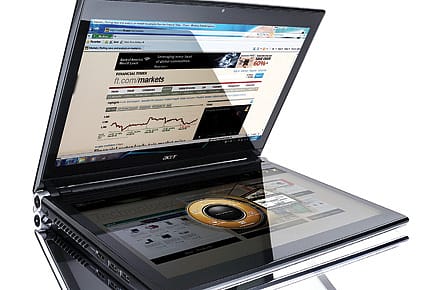
This dual-screen device has some geewhiz features, but their use beats me
I am not sure how to react to this product. I was really excited about it at first. But now that I have used it for over 10 days, I can't figure out what Acer was thinking when it designed the Iconia dual-screen notebook, or, as Acer likes to call it, the Touchbook.
Now, I can see a few uses for two monitors on the go. I normally carry a tablet and laptop while travelling on work. At my office, I use a machine with three monitors. But I don't want to lug a 2.8-kg monster just to avoid carrying two machines.
However, if you can get past this hurdle, you'll find that Acer has done a very good job with this machine. Its touchscreens and multi-touch function work really well.
Need a virtual keyboard? At the press of a single button, the lower screen turns into a keyboard—complete with a touchpad.
Iconia is not the first dual-screen notebook. But the Touchbook is better because it has a more powerful Core i5-480M processor and 4 GB Ram on board. Its integrated Intel HD graphics, however, are a letdown.
The hard disc is 640 GB; Windows 7 Home Premium 64 Bit Edition comes pre-loaded; there are two USB 2.0 ports and a USB 3.0 too. It supports HDMI as well as VGA for video output; and Gigabit Ethernet is built in. For Wi-Fi, it supports 802.11 b/g/n, and yes, the touchscreens are Gorilla Glass. Its battery life is a pitiable 2 hours, maybe because of the two large screens.

The Liberation of Bengal
05 Jun 2026 - Vol 04 | Issue 74
A silent revolution ends the reign of fear
The machine can be very useful for Photoshop, or for editing home movies. You can also get a full long web browsing page, so you don't have to scroll down too much. I loved this feature too—but could not figure how I would put it to use.